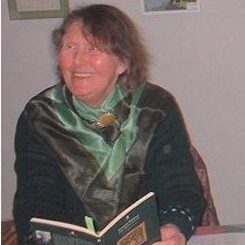

THEY SAY I’M A WELSH SHEEPDOG
They say I come of an ancient breed,
native to the land of Wales,
bred for the herding of mountain sheep
and all that that entails.
But somehow they must have got it wrong;
rolling in the manure heap
is my idea of farm work,
and I don’t rate sheep.
I’ve no inclination to chivvy the flock
or to sleep in a kennel or stable.
I prefer entertaining my guests
at a well laid dining room table.
In spite of my size I do my best
to climb on available laps, and my sleep
on my bean bag beside the fire
is quite untroubled by sheep.
by Brith [which means speckled in Welsh]

Thanks again Trefor. Too tired to make sense of everything tonight but will try again tomorrow. Think I can follow this but want to add picture and can’t as all my attenpts at doing so with add media posts the picts on my computer as DOCX which I don’t undrstand and don’t think it will appear on my post. However I shall try again tomorrow following your instructions.
Yes, I think you have to convert the MS .dockx files/images to .jpg files first before adding to your image collection; here’s one free converter online: https://www.freeconvert.com/docx-to-jpg
I do hope you manage to get your work uploaded.
Oh, the normal blue link nearly disappears in the black background, but it is there if you click on it.
You’ve succeeded Daffni, we can read your fine work as it should be presented! Just one thing left to do: go in edit and place the curser directly after the last letter, the ‘G’ of the unnecessary second heading adjoined to the image, and backspace until it’s deleted. (Then ‘Update’ and ‘view post’) Liked the poem by Brith, proudly posing while we enjoy the read! And too, the background, with, judging by the window, such thick walls to keep out the storms! Top marks for persevering!
Thanks again Trefor. I think I have managed the image thing at last. Yesterday a friend from our local computer shop came for an hour to help me with problems — some insurmountable like ‘get rid of unwanted interference by microsoft etc — apparently can’t do it. Have to put up with such things! But meanwhile as I have copied all your advice, I think, you can remove it all here if you want.My next job is to try to ressurect the ad to sell my scooter used for books to market. Bye for now
You did your best under the circumstances, Daffni. Have a good summer!
Thanks, shall do my best. Wish I could still do the garden but a friend comes to rescue me on that.
Oh dear! Obviously I don’t know how to shrink picture. Brith was a big dog but not this big! Same goes for sunonthehill
Daffni, if you go in ‘Edit’ and click on the big picture, once activated, you’ll see a small square at each corner (and at the middle of each side if a big picture), click the curser on one of the small squares and keep holding the clicked curse in, it doesn’t matter which square you choose, although top right is probably easiest, and then drag inwards with the clicked-in curser until the image is the size you want it, and release; dragging out with the clicked and held curser, makes the image bigger. By using the corner square, height and breadth proportions are kept.
Hello Trefor. Thanks but I’m still confused. If I click on edit the picture disapears so I can’t see the squares or anything to click.
I think with help of the computer shop people I have mastered the turning to jpgs. Judging by evidence here. I do have another nice pic of Brith, although he has gone hunting in the afterlife for dogs, mush to the regret of my 101 year old friend who with two other old friends who have also joined brith above.
I’m still no computer expert. Clicked edit but then picture disappeared. While post was still up tried clicking on big picture but no little squares. Perhaps I should have been trying your suggestion while picture still on my file? As to the poem by Brith — He certainly was no sheepdog. While still living with me he noticed a sheep loking at him while I was picking up logs and he fled, jumped a 5 bar gate and hid under my van. Now I need to find Sun On The Hill and see if I can shrink that picture.
The picture won’t disappear if in ‘Edit’ you just click on it, it would look like this, showing the small square you can click on and drag.
Click on this example I’ve posted here, and it will become larger and clearer.
But I can’t click on picture when it has vanished.
DaffniI’ve added and edited your poem with picture in submissions, using Windows 10 this time, (as my own work, then trashed it) to show you it is possible if you follow my instructions, and do only that. I’v also moved it all over ‘one indent’ to keep it all clear of the edge (don’t worry about doing this extra edit at this stage). I really don’t know where you are going wrong, but good luck, you’ll get there by trial and error!
Click on the image below to get it larger and clearer!
Oh, it’s all too small, I’ll publish it on Friday, and after you’ve read I’ll delete it.
Incidently, it can’t have vanished if it’s still on your submission i.e the poem here you’ve published, go in ‘Edit’ on this one!